Free Virtual Keyboard — Online Help
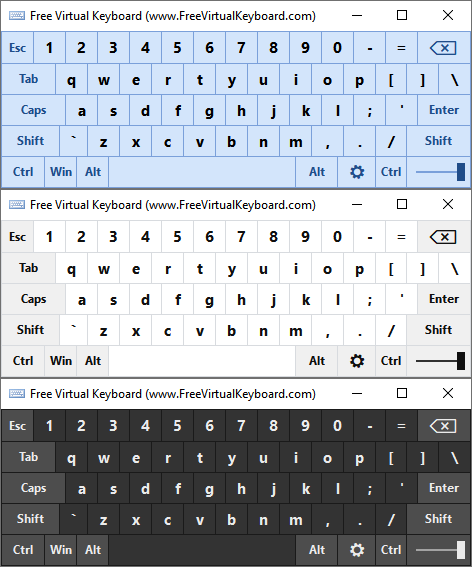
The free multilingual virtual onscreen keyboard
All on-screen virtual keys work just as they would if you were typing on a standard computer keyboard. Select a key, and Free Virtual Keyboard sends it to a word processor, e-mail message, web page, or other Windows application you may be using. The keyboard can be moved anywhere on the screen and can be resized to any size.
Free Virtual Keyboard can be used by anyone with a disability that prevents them from typing on a physical computer keyboard.
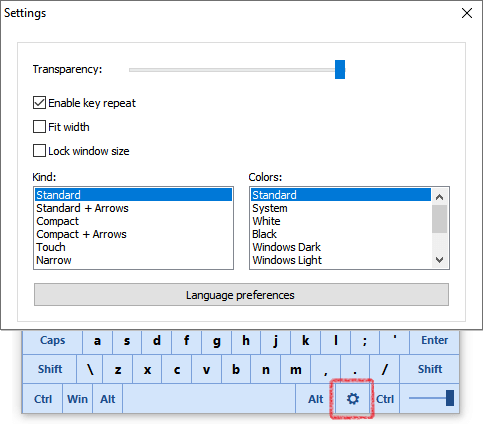
Also, with our virtual keyboard, you can:
- Change the size of the keyboard.
- Change the transparency of the keyboard.
- Turn on and off a key-repeat function ("Enable key repeat" setting).
- Scale the virtual keyboard to match the screen width ("Fit width" setting). It's a helpful feature for frequent screen rotation in the portrait and landscape modes.
- Lock the keyboard size.
- Change kind of the keyboard. Six types of virtual keyboards are available.
- Change theme colors.
- Type text in any language.
- Type text in other layouts (e.g., United States Dvorak for Left Hand).
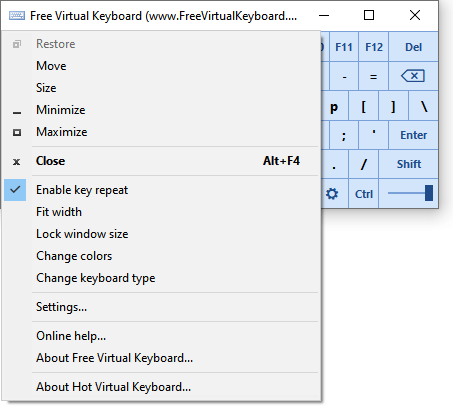
Settings are also available via the context menu:
How can I install another language and keyboard layout?
Click the Settings key on the virtual keyboard and click the Language preferences button.
See also:
- How to manage the input language settings (Windows 10, Windows 11)
- How to change the keyboard layout (Windows 7, Windows 8)
License Agreement for use and distribution
Free Virtual Keyboard is a free program for personal and commercial use.
This program is distributed on AS IS basis, and WITHOUT ANY WARRANTY;
without even the implied warranty of MERCHANTABILITY or FITNESS FOR A
PARTICULAR PURPOSE. Comfort Software Group cannot be made responsible for any,
direct or indirect, damage caused by the program.
Comfort Software Group reserves the right to change licensing terms in the future.